Watch a video about permissions and privacyI thought it might be helpful if we could post with our own personal Google IDs (if we have one). This would then show who made the post in the tagline. I sent invitations to a Bonnie and Judy as they were in the library and gave me their email addies. If the rest of you would like to do this, you can invite yourselves or send the email to Heather or myself and we can do it for you. Thanks, Connie
The following is the help from Blogger on how to do this:
An administrator of a team blog has access to the blog's settings and template, as well as the ability to edit and delete posts made by other members of the blog. Additionally, they can add or remove other team members. Any number of members can have admin rights on a single blog.
When you invite a team member to join a blog and they accept your invitation, they are listed as an "Author" by default. Authors can only create and edit their own posts. You can see a member's status in the "Permissions" section of the Settings | Basic tab, and it looks like this:
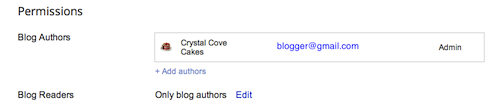
To change an author into an admin, you can use the drop-down menu next to that author's name. If there's only one admin member of a blog, it's not possible to revoke that person's admin rights.
Troubleshooting: If it is not recognizing you as an author when you accept the invitation it is because you are signed in as the current administrator. Instead, open two different browsers and sign into one with the account administrator sign in first, then accept the invitation using a different browser and sign in with your personal Google ID. Then switch back to the first browser and refresh so you can see the name in the authors window, and edit the author to be an admin.
The following is the help from Blogger on how to do this:
An administrator of a team blog has access to the blog's settings and template, as well as the ability to edit and delete posts made by other members of the blog. Additionally, they can add or remove other team members. Any number of members can have admin rights on a single blog.
When you invite a team member to join a blog and they accept your invitation, they are listed as an "Author" by default. Authors can only create and edit their own posts. You can see a member's status in the "Permissions" section of the Settings | Basic tab, and it looks like this:
To change an author into an admin, you can use the drop-down menu next to that author's name. If there's only one admin member of a blog, it's not possible to revoke that person's admin rights.
Troubleshooting: If it is not recognizing you as an author when you accept the invitation it is because you are signed in as the current administrator. Instead, open two different browsers and sign into one with the account administrator sign in first, then accept the invitation using a different browser and sign in with your personal Google ID. Then switch back to the first browser and refresh so you can see the name in the authors window, and edit the author to be an admin.
updated 02/15/2013

No comments:
Post a Comment